This article describes how you can further restrict access to Templafy, based on specific user attributes.
Prerequisites
-
Admin/owner access to the Templafy tenant.
- SAML2 or OpenIDConnect authentication method used.
|
Configuration
- Go to the Account tab in the left-side menu of the Admin Center.
- Go to the Authentication tab.
- Click Edit details for the Authentication method you want to edit.
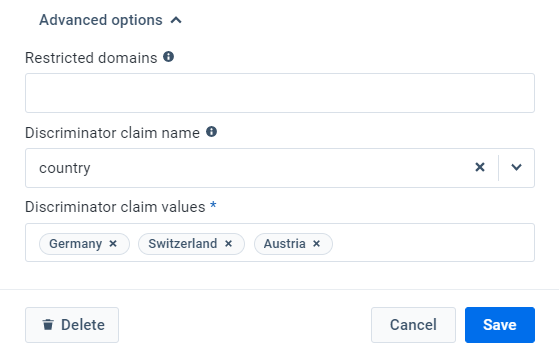
- Scroll down and click to expand the Advanced options settings.
- Select one of the below discriminator claims in the Discriminator claim name dropdown:
-
city.
-
companyName.
-
country.
-
department.
-
groups.
-
state.
-
customClaim (up to 15 custom claims for SAML2 only).
- Fill in one or more discriminator value(s) - use a comma when you want to add multiple values.
- Click Save.
Note
- An admin/owner cannot edit their own authentication method except for the Login button name.
- Only the claims available in the dropdowns can be used as discriminators.
- Only one discriminator claim can be set, but more than one value can be added (the operator will be "OR", e.g., country = Germany OR Switzerland OR Austria).
- Claims containing a comma are not supported.
- Claims are updated upon renewal of the Refresh Token, which is valid for 24h regardless of the IdP.
- If SCIM is in place, the creation and subsequent updates to claims will happen every 40mins.
|
Comments
Article is closed for comments.